 DSH-Fox
Coming soon to the App Store and Google Play · early access by invitation
Your AI agent on your PC, in your pocket
DSH-Fox runs an AI agent on your own computer and lets you drive it from your phone. You pair your machines with a QR code, bring your own LLM key, and approve every sensitive action before it happens.

What DSH-Fox does
DSH-Fox is an AI agent that works on your own computer, not in someone else's cloud. It reads and writes files in your workspace, runs tools, remembers context between sessions and can operate your Chrome browser. A companion app on your phone lets you chat with the agent, follow each step live and approve or reject actions from anywhere.
- Pair and switch between your own computers (PC or server) by scanning a QR code
- Chat with the agent and keep sessions organized by workspace
- Follow the agent's live trajectory, step by step
- Browse workspace files and download results on your phone
- Approve or reject actions before they run
- Long-term memory, reflection and focus settings on the PC
- Light, dark or automatic appearance in English, Portuguese (Brazil) and Spanish
How it works
Setup takes a few minutes and everything stays under your control. The agent runs on a computer you own, and your phone connects to it after a one-time pairing. Prompts go straight to the LLM provider you configure with your own key, so DSH-Fox never resells AI usage or sits between you and your model provider.
- Install the DSH-Fox agent on your computer and sign in with your DSH-Fox account.
- Paste your LLM API key in Settings. DSH-Fox detects the provider and checks the key with that provider.
- Open the DSH-Fox app on your phone and scan the pairing QR code shown on the computer.
- Start a session from the phone or the PC and approve sensitive actions when the agent asks.
Bring your own LLM key
DSH-Fox does not sell AI tokens. You paste an API key from the provider you already use and the agent talks to that provider directly. The key stays in the credential vault on your computer and is sent only in the request header to the provider you chose, never to Central Fox servers or to other providers.
Providers supported by automatic key detection include:
- OpenAI
- Anthropic
- Google Gemini
- Mistral
- xAI
- Groq
- OpenRouter
- Together AI
- Fireworks
- Cerebras
- Perplexity
- Moonshot (Kimi)
- DeepSeek
Each provider issues keys in its own console, for example the Anthropic API getting-started guide and the OpenAI developer quickstart.
DSH in Chrome
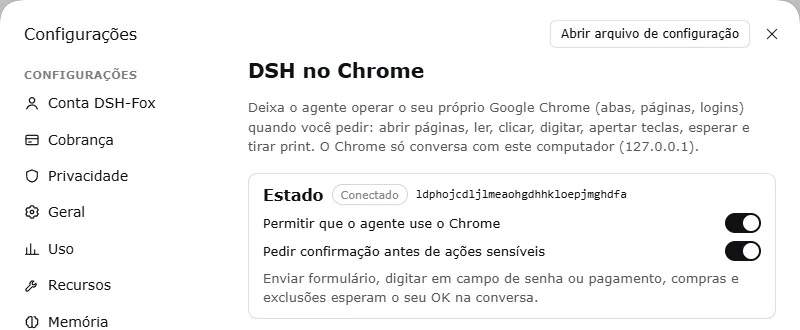
With the DSH in Chrome extension, the agent can use your own Google Chrome when you ask: open pages, read them, click, type, press keys, wait and take screenshots. Chrome only talks to the agent on the same computer. Sensitive actions such as submitting forms, typing in password or payment fields, purchases and deletions wait for your OK in the chat.
- Confirmation before sensitive actions, on by default
- Block list and optional allow list of sites
- Works with the tabs and logins you already have
Plans and pricing
DSH-Fox has two plans, both with a 14-day free trial for new subscribers. Basic costs US$ 5.99 per month or US$ 47.99 per year and covers the phone app plus pairing with your own computers. Pro costs US$ 11.99 per month or US$ 99.99 per year and adds hosted services for when your computer is offline.
| Feature | Basic | Pro |
|---|---|---|
| Monthly price | US$ 5.99 | US$ 11.99 |
| Yearly price | US$ 47.99 (save 33%) | US$ 99.99 (save 30%) |
| Free trial | 14 days | 14 days |
| DSH-Fox app on your phone | Included | Included |
| Pair your own computers (PC or server) | Included | Included |
| Use your own LLM key | Included | Included |
| Hosted relay | — | Coming soon |
| Message queue | — | Coming soon |
| Push notifications | — | Coming soon |
Subscriptions are purchased in the App Store or Google Play and renew monthly or yearly. Cancel in the store before the trial ends to avoid being charged.
Availability and early access
The DSH-Fox apps are coming soon to the App Store and Google Play. Right now the iOS app is in internal testing and early access is by invitation. Send us an email or a WhatsApp message with the computers you want to pair and the LLM provider you use, and we will reply with the next available invitation.
Privacy and security
DSH-Fox is built so your work stays yours. There are no ads and no tracking SDKs in the apps, and relay messages are end-to-end encrypted. Your prompts go to the LLM provider you choose, your files stay on your computer, and you can delete your account at any time from the app, the PC or by email.
- No ads and no tracking SDKs
- End-to-end encrypted relay messages
- Confirmation before sensitive browser actions
- Account deletion from the app, the PC or by email
Read the details:
Frequently asked questions
These are the questions people ask most before trying DSH-Fox. They cover what you need to start, how billing works with your own LLM key, where your data goes, which languages are available and when the mobile apps reach the public stores. If your question is not here, write to contato@centralfox.online and we will answer it.
Do I need my own LLM API key?
Yes. DSH-Fox does not sell AI usage. You paste an API key from a provider such as OpenAI, Anthropic, Google Gemini or Mistral, and the agent sends your prompts directly to that provider. Usage is billed by the provider to your own account.
Where does the agent run?
On a computer you own, such as your PC or a server. The phone app is a remote control: it pairs with your computers through a QR code and lets you chat, follow the agent's steps and approve actions.
How much does DSH-Fox cost?
Basic costs US$ 5.99 per month or US$ 47.99 per year. Pro costs US$ 11.99 per month or US$ 99.99 per year. Both plans include a 14-day free trial for new subscribers.
What does the Pro plan add?
Pro includes everything in Basic plus a hosted relay, a message queue and push notifications for when your computer is offline. These Pro services are rolling out and are marked as coming soon.
Can the agent use my web browser?
Yes, with the DSH in Chrome extension. The agent can open, read and interact with pages in your own Chrome. Sensitive actions such as submitting forms, typing passwords or payments, purchases and deletions wait for your confirmation.
Which languages are available?
The apps and this website are available in English, Portuguese (Brazil) and Spanish.
When will the apps be in the App Store and Google Play?
Soon. The iOS app is in internal testing and the Android app is being prepared for release. Early access is by invitation: email contato@centralfox.online or message us on WhatsApp.
How do I delete my account?
You can delete your account immediately from the DSH-Fox app or the PC settings, or request deletion by email. The account deletion page explains each option.